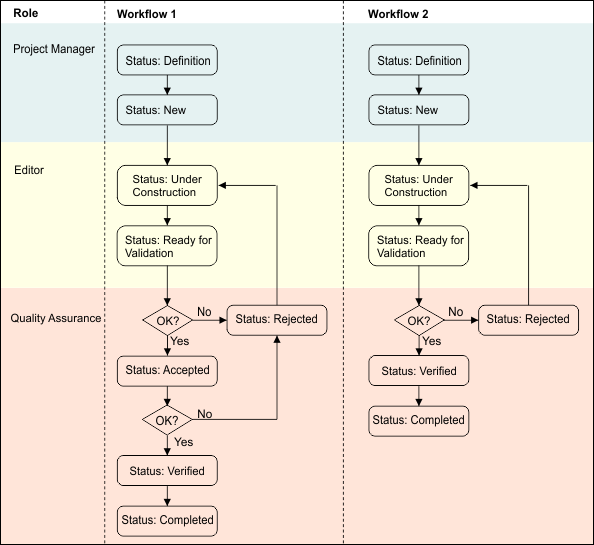
The project status indicates the stages of the workflow in a project. This chart shows the status values and which HPD roles are responsible for setting them.
The Accepted status is optional.
The following roles are responsible for setting project status:
• Project Manager: Creates projects which are assigned an initial status of Definition. The Project Manager sets the status to New when the project is ready to be used.
• Editor: Edits a New project. The status is changed to Under Construction when the first task is saved to the HPD database. When editing is completed, the Editor sets the status to Ready for Validation.
• Quality Assurance: Quality Assurance reviews the project and changes the status to Rejected then to either Accepted or Verified, depending on workflow.
Direct projects are set to Verified in Project Editor by the Quality Assurance user. Isolated projects are automatically set to Verified when they are checked into the source and the changes are saved to the database.
Status is set to Completed when all aspects of the project are finalized.
How can projects be set up?
Every function performed on an HPD database, including data loading, editing, product creation, or quality assurance, is associated with a project. A project offers a mechanism by which related tasks are tagged.
In a simple case, a small number of projects may be created for
• loading all data,
• editing or updating information, or
• creating products.
In more complex approaches, many projects may be created for:
• each load operation,
• each updating task based on new data availability, and
• each product created from an HPD database.
How are sources related to projects?
Projects are typically related to the availability of new data sources. This data can be associated with projects by creating sources, one per source data file under consideration. Sources can include:
• new electronic chart data sets to be loaded into the database,
• new survey information, or
• reports from other departments, agencies or individuals relating to the database coverage area.
For each piece of data, the Project Manager can create a new source using Project Editor. In turn, each source can be related to the relevant project, possibly with many Sources being related to a single project.
How are projects related to projects?
In a complex scenario, hierarchical projects can be created with one overall project created to identify the highest level of work.
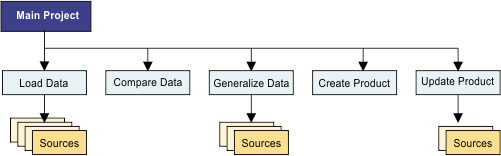
You can create separate projects for each lower-level task, some of which may have their own data sources (for example, projects relating to loading data). You can then add each of these projects to the overall project.
For example:
• loaded into a database,
• compared to other data,
• generalized onto different usages, and
• new products created or existing ones updated.