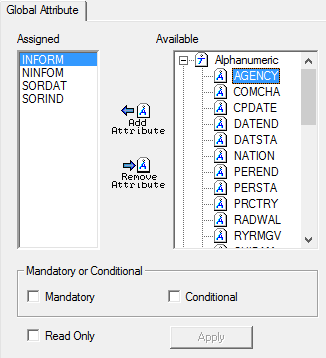
Global attributes are applied to all objects in a profile.
1. Select Global in the Attribute Classes branch.
The Global Attributes tab is displayed.
Option | Description |
|---|---|
Assigned | Attributes that are applied as global in the profile. |
Available | All attributes in the profile. |
Mandatory or Conditional | Mandatory: • On: The selected attribute is mandatory. • Off: The selected attribute is optional. Conditional: • On: The selected attribute is conditional. • Off: The selected attribute is not conditional. |
Read Only | On: The attribute values are read-only. Off: The attribute values can be modified. |
Command | Description |
|---|---|
Add Attribute
| Assign an attribute as a global attribute. 1. Expand the Available list. 2. Select an attribute. 3. Click Add Attribute. The attribute is moved to the Assigned list. |
Remove Attribute
| Remove an attribute, 1. Select the attribute in the Assigned list. 2. Click Remove Attribute. The attribute is moved to the Available list. |
2. Add and remove any necessary attributes.
3. Select any necessary options.
4. Click Apply.

