 CARIS HPD Paper Chart Editor
 CARIS HPD Paper Chart Editor
This command is only available if the Raster Chart Module is enabled. |
Menu | Raster > Select by Magic Wand |
Tool |
|
Select an area in a raster image by clicking a single pixel. All connected pixels of the same colour are selected.
Related commands:
• | • |
Procedure
1. Select a raster layer.
2. Select the Select by Magic Wand command.
The pointer changes into the magic wand pointer.
3. Position the pointer over an area and click the mouse button.
For example, to select "T", select one of the pixels in its shape.
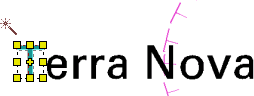
All connected pixels of the same colour are selected.
4. To keep selecting, press and hold <Ctrl>, position the pointer, and click.

All pixels connected to each pixel you selected are also selected.

