 CARIS HPD Paper Chart Editor
 CARIS HPD Paper Chart Editor
CARIS HPD Product Editor
CARIS HPD Source Editor
Menu | Projects > Review Project Changes > Current Project Projects > Review Project Changes > Select Project |
View changes implemented in the current or a selected project.
This command creates layers that contain changes that were made in the current project.These will differ depending on the changes, but can include New, Modified, Deleted and Superseded.
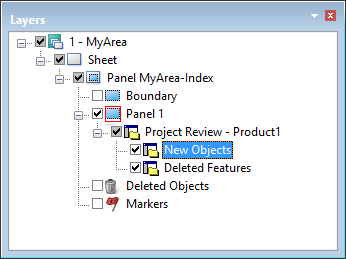
Features that are verified as deleted are displayed on the Deleted layer. Features that are marked as deleted but not verified are on the Modified layer.
Related commands:
• • • • • • • • • | • • • • • • • |
Procedure: Current Project
1. Select the layer that contains the changes.
2. Select the Current Project command.
A layer named Project Review is created.
This contains a group of layers that contain the actual changes.
Procedure: Selected Project
1. Select the layer that contains the changes.
2. Select the Selected Project command.
The Select Project dialog box is displayed.
3. Select the project that contains the changes and click OK.
A layer named Project Review is created.
This contains a group of layers that contain the actual changes.