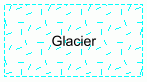
Dynamic fills are drawn automatically when an area feature in an INT1 portrayal is digitized or displayed. The fill pattern is linked to the feature through the asymrefs.dic lookup table, the pattern definition file, and Portrayal Control File.
For example, an ICEARE (ice area) feature with a CATICE (category of ice) set to 5 (glacier) can be digitized or drawn with the fill pattern shown below.
Fill patterns cannot be drawn until the <PatternFile/> instruction in the Portrayal Control File is set. See below.
<PatternFile File="%PCEConfig%\annotations\pattern_definitions.xml" /> |
This instruction points to the a pattern fill file (in this case, pattern_definition.xml). The <PatternFile/> instruction is not a default setting and must added manually to the INT1 portrayal section.
The pattern file contains the following instruction for drawing glacier patterns.
<PatternDefinition Name="Glacier" Description="C25 Glacier S-4"> <SymbolDefinition Size="2.0" Style="STAGGERED" SymbolId="GL_1" Spacing="1.0" Rotation="0" Colour="Cyan" /> <SymbolDefinition Size="2.0" Style="OFFSET_STAGGERED" SymbolId="GL_2" Spacing="1.0" Rotation="0" Colour="Cyan" /> </PatternDefinition> |
The Glacier pattern includes two symbols: GL_1 and GL_2. These two symbols alternate with each other when drawn to chart. The two symbols are recorded in the master file (ih_master.txt).
The pattern definition is linked to the ICEARE feature through the asymref.dic file. See below
"ICEARE","CATICE5","AC(White);AP(Glacier);LC(NFGLBDYS4)","6","S", "DISPLAYBASE","0" |
The AP(pattern_definition) instruction links the Glacier pattern to the ICEARE feature. This instruction is applied to ICEARE features where the category of ice attribute is set to 5 (glacier).