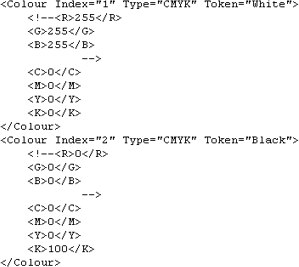
The ih_colour.xml file is a colour map that defines colours for features. Each colour is assigned an index number and colour token. Colours can be defined as:
• RGB (Red, Green, Blue)
• CYMK (Cyan, Yellow, Magenta, Key)
• HLS (Hue, Light, Saturation) values.
An example of the colour map is shown below.
You can add or change colour definitions directly by editing the file in a text editor. The <!-- and --> tags around the RGB values means that the RGB values are not active. To make the RGB values active, remove the tags and place them around the CYMK values.
Transparencies can be created using the Alpha tag.
The Alpha value sets the visibility of a colour. A value of 0 means that the colour is completely transparent and not invisible. A value of 100 means that the colour is completely opaque; areas beneath any feature with this colour are not visible.
In the following example, the colour is set to 80% transparency.
<Colour Index="9" Type="CMYK" Token="Traffic_Seperation_Pink"> <C>0</C> <M>30</M> <Y>0</Y> <K>0</K> <A>20</A> |