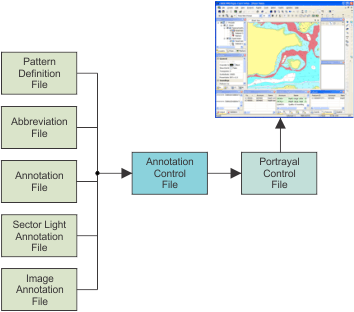
The following diagram shows how the annotation files and presentation control file work together to display annotations.
In this example, an annotation is added to a LIGHTS feature.
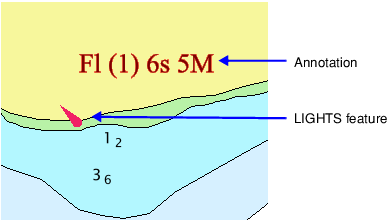
The annotation type is determined by the annotation file (annotationfile.xml). Annotation information for the LIGHTS feature from this file is shown below.
<Object Acronym=”LIGHTS”> <Filter> <PrimitiveIsEqualTo Primitive=”Point”/> </Filter> <CreateAnnotation Acronym=”$ltinf” Description=”Light Information” Font=”Times New Roman” Size=”10” Bold=”False” Italic=”False” Underline=”False” HJust=”Left” VJust=”Bottom” XOffset=”3” YOffset=”3”> <Attribute Acronym=”LITCHR” Postfix=” “ UseAbbreviation=”True”/> <Attribute Acronym=”SIGGRP” Postfix=” “/> <Attribute Acronym=”SIGPER” Postfix=”s “ Format=”###.#”/> <Attribute Acronym=”HEIGHT” Postfix=”m “ Format=”###.#” Units=”Metres”/> <Attribute Acronym=”VALNMR” Postfix=”M” Format=”##.#” Units=”Metres”/> </CreateAnnotation> </Object> |
The annotation feature $ltinf is associated to the LIGHTS feature. The $ltinf feature also includes formatting information (type face, font size, justification, etc.). The annotation text itself is a composite of attribute values for the LIGHTS feature.
The attribute and corresponding annotation display for the annotation shown above are listed in the following table.
Attribute | Annotation Presentation |
|---|---|
LITCHR (light characteristics) | UseAbbreviation=True |
SIGGRP (signal group) | (1) |
SIGPER (signal period) | 6s (s for seconds in period) |
VALNMR (value of nominal range) | 5M (M for Miles of range) |
LITCHR uses the condition, UseAbbreviation=True. This means that this attribute value is represented by a code in the abbreviationfile.xml file. See below,
<Abbreviation String="flashing" Value="Fl"/>
The LITCHR attribute value is set to “flashing” but this is replaced by Fl from the abbreviation file.
Annotations are linked to a portrayal through the portrayal control file. This file lists the annotation style and annotation control file being used by a portrayal. See example below.
<PresentationOptions Type="Paper" Name="INT1" Description="INT1 - Original"> <LookupTables> <AreaLookup File="%PCEConfig%\lookup\asymrefs.dic" /> <LineLookup File="%PCEConfig%\lookup\lsymrefs.dic" /> <PointLookup File="%PCEConfig%\lookup\psymrefs.dic" /> </LookupTables> <MasterFile File="%uslXmaster%" /> <SymbolFile File="%uslXsymbol_5%" /> <ColourFile File="%PCEConfig%\ih_colour.xml" /> <FeatureCodeColourMapFile File="%PCEConfig%\fcmap.txt" /> <SymbolOrientation>NorthUp</SymbolOrientation> <RasterLayersFile File="%PCEConfig%\rasterlayers.txt" /> <Annotations> <AnnotationControlFile File="%PCEConfig%\..\annotationcontrol.xml" /> <AnnotationRules Id="Annotations" /> </Annotations> </PresentationOptions> |
The annotation style is read from ID attribute in the <AnnotationRules /> tag.
The files that control display for the annotation style are listed in the annotation control file in the File attribute of the <AnnotationControlFile /> tag.
Prior to HPD 3.0, annotations styles were controlled through the Annotation Identifier (annoid) attribute. This attribute is still used in HPD 3.0 to identify annotation styles in upgraded schemas. However, new annotation styles and associated files must be set through the portrayal control file.
Annotation styles are accessed through the portrayal control file and not through the annoid attribute. |