See the image below on how Onboard components interact with survey data and bathymetric products. Each of the components is described below.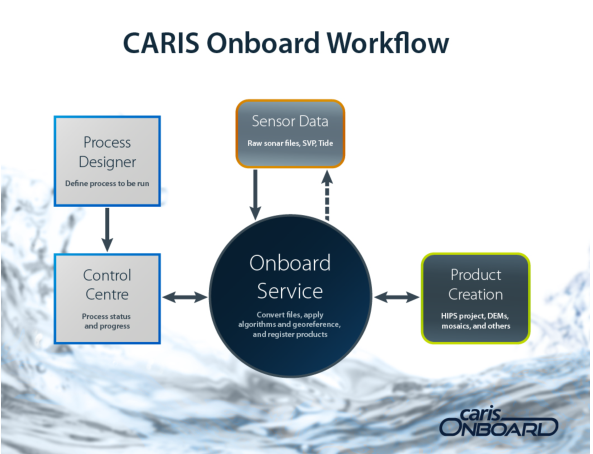
CARIS1 Onboard™ runs automated processing on survey data as the data is being acquired by a survey platform. For example, as an Autonomous Underwater Vehicle (AUV) gathers data, Onboard runs processes that convert the data to HIPS2 and SIPS2 format, applies corrections, creates products, and exports data to third-party formats. These processes are monitored by a survey crew who can add or remove processes when necessary.
Because Onboard processes data during acquisition, time and resources are saved in post-survey processing.
Onboard consists of four components:
• Process Designer
• Onboard Service
• Control Centre
• Onboard Viewer
See the image below on how Onboard components interact with survey data and bathymetric products. Each of the components is described below.
Process Designer
Process Designer is a stand-alone application that builds process files used to run processes for the Onboard Service.
Examples of processes include:
• data conversion to HIPS and SIPS format
• sound velocity correction, load tide, merge, etc.
• product creation, e.g. grids or mosaics
• export data to a third-party formats
• product registration
Process Designer is used to create and edit process model files. A process model file is a sequence of processes and their associated configurations, connected in a logical sequence. Process models are stored as XML files with a file extension of "processmodel". Process model files are processed through the Onboard Service, which can be monitored through Control Centre. Sample process model files are provided with the Onboard installation and can be found at:
C:\ProgramData\CARIS\Onboard\2.2\Samples
Process Designer can be installed remotely from the survey vessel.
See Process Designer documentation for more information.
Onboard Service
Onboard is a Windows service that monitors raw data files from the acquisition system and runs process model files on survey data. Processes are initiated from the Control Centre. A process method file is uploaded to the Onboard Service in Control Centre.
Control Centre
Control Centre provides an interface for survey staff to direct and monitor Onboard Services. With Control Centre, staff can organize processing by:
• Pointing to the directory that contains survey data.
• Defining the type of survey data that is to be processed by the Onboard Service.
• Selecting a process model file for running processes.
• Starting the Onboard monitor.
As survey data is processed by the Onboard service, survey staff can monitor the processing and stop and start the service if needed.
Control Centre is opened in an Internet browser (e.g. Chrome, Firefox, and Internet Explorer) and while in operation, lists the start and end times for the processing of a survey data file along with processing status for each file.
The processed survey data can be displayed in the browser along with a coverage map for the survey area. The coverage map can be sourced from OpenStreetMap® if an internet connection is available, or from a base map downloaded and installed from the Teledyne CARIS Customer Service website.
See The Onboard Control Centre for more information.
Onboard Viewer
Onboard Viewer is a desktop application that accompanies the Onboard Control Centre application. Viewer provides users with an interface to connect to the Onboard service and view data as it is processed in Control Centre. Background files relevant to the data can also be opened and viewed as a reference for the data being processed. Various tools are provided in the Viewer interface to adjust the display of the data or perform selections for further analysis.
1 This term is a trademark of Teledyne CARIS Reg. USPTO and CIPO.
2 This term is a trademark of Teledyne CARIS Reg. USPTO.