The entry for INT1 in the Portrayal Control File is as follows.
<PresentationOptions Type="Paper" Name="INT1" Description="INT1"> <LookupTables> <AreaLookup File="%PCEConfig%\lookup\asymrefs.dic" /> <LineLookup File="%PCEConfig%\lookup\lsymrefs.dic" /> <PointLookup File="%PCEConfig%\lookup\psymrefs.dic" /> <TextLookup File="%PCEConfig%\lookup\tsymrefs.dic" /> </LookupTables> <MasterFile File="%uslXmaster%" /> <SymbolFile File="%uslXsymbol_5%" /> <ColourFile File="%PCEConfig%\ih_colour.xml" /> <FeatureCodeColourMapFile File="%PCEConfig%\fcmap.txt" /> </PresentationOptions> |
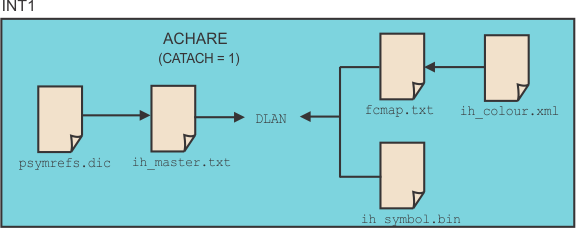
The following image shows how the INT1 files in the Portrayal Control file are applied to draw an Anchorage Area (ACHARE) point feature.
The ACHARE (anchorage area) point feature contains an attribute value CATACH=1 (category of anchorage = unrestricted).
Because ACHARE is a point feature, CARIS looks in the points lookup table (psymrefs.dic) for the ACHARE feature code. The lookup table is referenced from the <PointLookup/> tag in the Portrayal Control file.
There is more than one entry for ACHARE in psymrefs.dic so CARIS uses the second entry that matches CATACH1.
"ACHARE","","SY(IN10)","8","S","DISPLAYBASE","0" |
"ACHARE","CATACH1","SY(DLAN)","8","S","DISPLAYBASE","0" |
"ACHARE","CATACH4","SY(IN12)","8","S","DISPLAYBASE","0" |
"ACHARE","CATACH5","SY(NPALHO)","8","S","DISPLAYBASE","0" |
"ACHARE","CATACH6","SY(NPAWSP)","8","S","DISPLAYBASE","0" |
In this case, the application must draw the anchorage point feature with the symbolization code DLAN.
CARIS now gets drawing instructions from the master file for symbol codes (ih_master.txt) The master file is referenced through the <MasterFile/> tag in Portrayal Control.
DLAN 0 IN12.1 Anchorage BK N DD 08 10 00 1 00 8 |
DLAN S0 DLAN1/LWT=.203/SIZ=3.54, |
DLAN S1 DLAN2/LWT=.102/SIZ=4.80 |
The symbol codes are DLAN1 and DLAN2, so the drawing instructions for this code are read from the symbol file (ih_symbol.bin). The symbol file is referenced from the <SymbolFile/> tag in Presentation Control. The default sizes for the symbols are given at 3.54 mm and 4.80 mm.
The colour table file (fcmap.txt) indicates which colour is used with this feature code. In this case, the colour for DLAN is nautical_purple.
The colour map file (ih_colour.xml) file that the colour definition for nautical_purple are RGB values 226, 66, 204. The file is referenced by the <ColourFile/> tag in Portrayal Control.
The feature is drawn in the Display window.