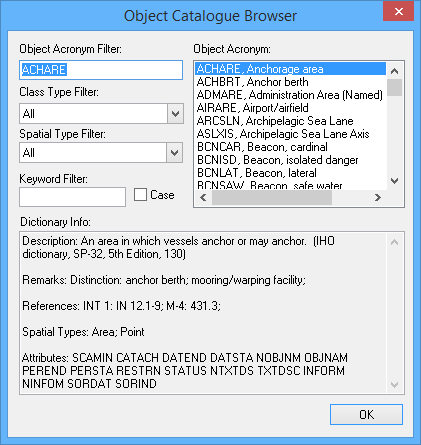
Menu | Help > Catalogue Browser > Objects |
Search for information about S-57 features.
Related commands:
Procedure
1. Select the Object Catalogue Browser command.
The Object Catalogue Browser dialog box is displayed.
Option | Description |
|---|---|
Object Acronym Filter | Type the first few letters of the acronym you are looking for. The Object Acronym list changes to match. |
Class Type Filter | Select a class from the list. The Object Acronym list changes to match. |
Spatial Type Filter | Select a spatial type from the list. The Object Acronym list changes to match. |
Keyword Filter | Filter on all fields that define the acronym. The Object Acronym list changes to display acronyms that contain your text anywhere in the definition. Case: • On: The filter is case sensitive. • Off: The case of the search term will be ignored. |
Object Acronym | The list of acronyms. This list changes as you use the filter options. Click on a item in this list to display its data in the Dictionary Info box. |
Dictionary Info | The acronym information. The information includes a description, attributes, and remarks. Information about attributes includes name, type, and values. |
2. [Optional] Select a filter to reduce the number of acronyms in the Object Acronym list.
3. Select the acronym you want.
4. Click OK to close the browser.