Option | General > Connection |
Define proxy settings that let you reach external URLs if the application is behind a firewall.
Procedure
1. Select the Options command.
Menu | Tools > Options |
2. Select the General tab.
3. In the Connection option, click the browse (...) button.
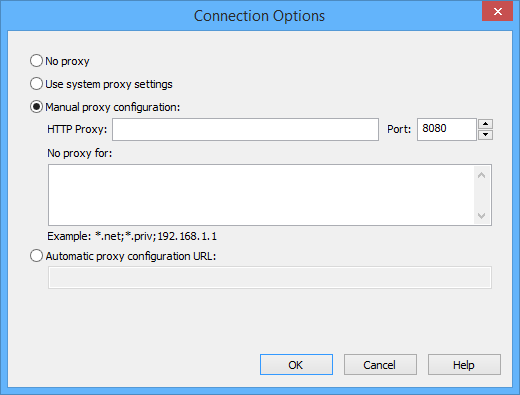
The Connection Options dialog box is displayed.
Option | Description |
|---|---|
No proxy | No proxy setting is required because the application is not on a network computer behind a firewall. |
Use system proxy settings | Use the proxy server settings defined for the operating system. These are defined in the Control Panel under the Local Area Network (LAN) settings |
Manual proxy configuration | Manually define proxy settings. • HTTP Proxy: The name of the network computer acting as the proxy server. • Port: The port number on the server computer being used to send and receive information. Select a value using the arrows or type it manually into the field • No proxy for: Specify connections that do not require a proxy server but might trigger the firewall. The exceptions are entered as a list of comma separated patterns. |
Automatic proxy configuration | Specify the location of a Proxy Automatic Configuration (PAC) file on the network. A PAC file is a JavaScript function which contains network IP addresses and predefined settings for the proxy server and port. |