Menu | View > Windows > Model |
Pop-up | Model (Status Bar) |
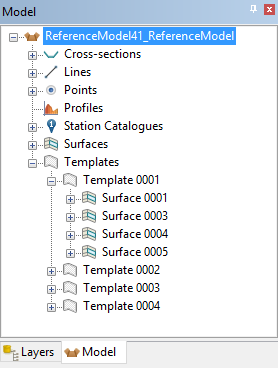
The Model window provides a tree-structure view of the current reference model. From this window, all features in the model can be viewed and selected. Reference model features can also be added to or removed from the model from this window.
Right-clicking a feature in the Model window displays a context menu. The following commands are available in this menu:
Command | Function |
|---|---|
Add Feature to Selection | Add the currently highlighted reference model feature to the Selection window. If other features are already selected, the feature will be added to the current selection rather than replacing it as is done when clicking features. See Select Active Model Feature for more information. |
Delete Feature | Remove the currently highlighted feature from the reference model. See Delete Feature for more information. |
Delete Sub-Tree | Remove a reference model feature sub-tree, containing one or more features, from the reference model. See Delete Sub-Tree for more information. |
Create New Point | Digitize a new reference model point. See New Point By Digitizing for more information. |
Create New Alignment | Digitize a new reference model alignment. See New Alignment By Digitizing for more information. |
Create New Cross-section | Create a new cross-section for the reference mdoel. See New Cross-section for more information. |
Create New Surface | Digitize a new reference model surface. See New Surface By Digitizing for more information. |
Create New Vertical Surface | Digitize a new vertical surface in the reference model. See New Vertical Surface for more information. |
Create New Supersurface | Create a new supersurface from existing reference model surfaces. See New Supersurface for more information. |
Create New Template | Create a new reference model template using an existing cross-section. See New Template from a Cross-Section for more information. |
Create New Line | Create a new reference model line using existing reference model points. See New Line from Existing Points for more information. |
Create New Profile | Create a new reference model profile using existing reference model points. See New Profile for more information. |
Create New Station Catalogue | Create a new station catalogue in the reference model. See New Station Catalogue for more information. |