Menu | Tools > Coverages > TIN > Digitize Point |
Tool |
|
Pop-up | TIN Editor > Digitize Feature > Point (Layers window) |
Menu | Tools > Coverages > TIN > Digitize Point |
Tool |
|
Pop-up | TIN Editor > Digitize Feature > Point (Layers window) |
The Point command allows you to add a new point to a TIN. The points in a TIN represent elevations in the data for which you are creating a TIN. The triangles in the TIN are formed around these points, as they act as connectors. The more points you have, the more accurate your TIN representation will be. Depending on the level of detail required for a particular task, a new point might be needed if there are multiple variations in elevation in a particular area, but only a few surface points.
Procedure
1. Select the TIN Editor layer in the Layers window.
2. Click the check box to turn on the TIN Editor layer.
3. Select the Point command.
The Tool Depth dialog box is displayed.
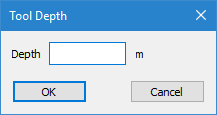
4. Enter the depth for the point in the Depth field.
5. Click OK.
The cursor changes to digitizing mode.
6. Click in the location where you want to place the new point.
The point is digitized, but it is not yet applied to the TIN or saved.
7. Select the Update TIN command to apply the new point to the TIN and save the changes to the TIN Editor layer.
Menu | Tools > Coverages > TIN > Update TIN |
Tool |
|
Pop-up | Update TIN (Display window) |
8. Refresh the Display window.
The edges in the TIN are updated based on the new point.

