Menu | Tools > > Editors > Single Beam > Single Beam Editor > Add Depth |
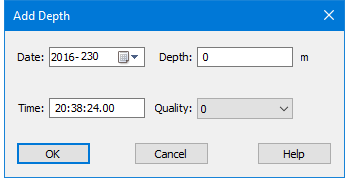
Pop-up | Add Depth |
In Single Beam Editor, add a new sounding by supplying time and depth. The position of the new sounding is interpolated from the existing navigation data (using the supplied time). A quality code can also be entered. If you enter a new depth, a new observed depths file and a new slant range (travel time) file is generated.
You can add depths by selecting an existing sounding and inserting a new depth or by creating a new timestamp without selecting an existing sounding.
Related commands:
Interface
The depths are added using the Add Depth dialog box.
Procedure
1. Select a data line,
2. Open the Single Beam Editor.
3. Select the Add Depths command.
4. Select the Depth field and type a new depth value
5. Select the Time field and type a new timestamp value.
6. Select a new quality flag, if needed.
7. Click OK to add the new depth value to the file.