Menu | Tools > HIPS and SIPS > Navigation > Shift |
Use command this to apply a shift in latitude and longitude to an entire survey. Latitude and longitude can be shifted independently to a maximum of 1 minute (0.016667 in decimal degrees and 1800S metres).
The shift can be applied to a selected line or lines, or to all open track lines. These offset values can be positive or negative.
After data is shifted this way, Merge must be applied.
Interface
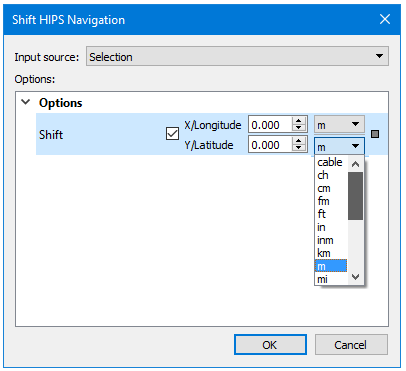
Navigation positions can be shifted using this dialog box:
Procedure
1. Select the Shift Navigation command.
The Shift Navigation dialog box is displayed. By default, the Shift Navigation check box is disabled.
2. Select Selection or All track lines in the Input Source field.
3. Select the check box to activate the X/Longitude or Y/Latitude offset value fields.
4. Type the amount of shift in one or both offset fields.
5. Select the units in which to apply the shift, from the drop-down list.
6. Click OK.
7. [Optional] Click Cancel to cancel the process.