Menu | File > Export > Points |
Export the values from a coverage to a point cloud in CSAR format. The source coverage can be a raster surface, point cloud or variable resolution surface.
This command can also export data to LAS format. See Export Points to LAS.
Interface
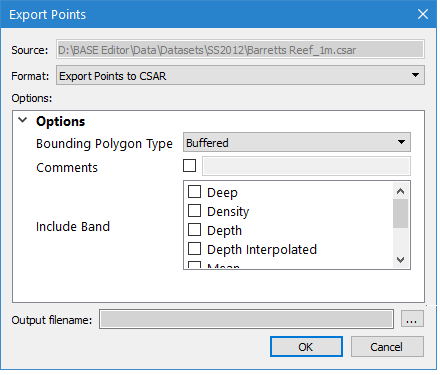
The Export Points to CSAR command uses the following dialog box:
Option | Description |
|---|---|
Source | The name and location of the input file. The Source is defined by the coverage that was selected at the time the command was initiated. This setting cannot be changed. |
Format | The output format for the resulting CSAR point cloud file. |
Options | The options for the selected output format. The available options will differ based on the selection in the Format drop-down list. If you hover the mouse cursor over the name of an option, a brief description of the option is displayed in a screen tip. |
Output filename | The name and location for the output point cloud file. 1. Click the browse button (...) to specify a name and location. |
Procedure: Export to CSAR
1. Select the parent layer of the coverage to export.
2. Select the Export Points command.
The Export Points dialog box is displayed.
3. Select CSAR for the output Format.
4. Define any necessary Options.
5. Specify a name and location for the Output filename.
6. Click OK.
The data is exported to a new point cloud.