Menu | Process > Compute > Towfish Navigation |
To compute towfish navigation from the ship’s navigation requires a horizontal distance and direction from the ship’s towpoint location to the towfish. The towpoint is defined in the vessel file.
• Horizontal distance. Recorded horizontal layback data or actual cable length both share the same data structure in SIPS called SSS Cable Out. SIPS can distinguish between the two by the towfish sensor depth data. If the sensor depth data is zero, the horizontal layback is used. If the sensor depth data is non-zero it will be combined with the cable out data using trigonometry to produce horizontal distances. All distances to the towfish are applied from the towpoint position on the ship as defined in the vessel file.
• Direction. The direction from the ship’s towpoint location to the towfish is derived using a “follow-the-dog” method. The average of the first 30 seconds of the ship’s “course-made-good” is used for the initial direction. Thereafter, each successive position computed for the towfish occurs along the direction from the ship’s next position to the previous towfish position.
If horizontal layback or tow cable length data is not available, or if the Compute Towfish Navigation step is not executed, then the recorded towfish navigation data converted into HIPS and SIPS is used for generating the positions of contacts and for mosaics.
If towfish navigation is not available at all then the position of the side scan imagery data is assumed to be the same as the ship navigation data.
Navigation data for towed sensors can come from the following sources:
• If computed during data logging and stored in the raw side scan format, it can be converted directly into the SIPS towfish navigation data structure. The Compute Towfish Navigation process is therefore not required.
• It can be computed by SIPS if specific sensor data is available. SIPS requires ship navigation data with cable out and towfish depth to compute towfish navigation, or ship navigation with horizontal layback.
Side Scan Editor does not have to be open to use the Compute Towfish navigation function.
Option | Description |
|---|---|
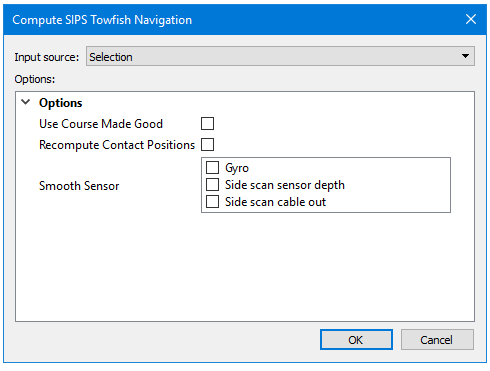
Input source | Selection is displayed by default if any track lines are selected. You can change this to “All track Lines” If no data is selected Compute will be applied to all track lines. |
Use Course Made Good | Calculates Course Made Good from the Navigation for heading data. Otherwise stored gyro is used. |
Recompute Contact Positions | If contacts are contained in the track lines where towfish navigation has been updated, you must update the contact positions to match the new navigation. |
Smooth Sensor | Check the box for the sensor data to apply. By default none are set to be applied. |
Procedure
1. Select one or more towfish track lines.
2. Select the Recompute Towfish Navigation command.
3. Set options in the Compute SIPS Towfish Navigation dialog box.
4. Click OK.
Towfish sensor data can also be smoothed in the Attitude Editor and this data can be applied when the towfish navigation is computed.