Pop-up | Find (Output window) |
Key | Ctrl + F |
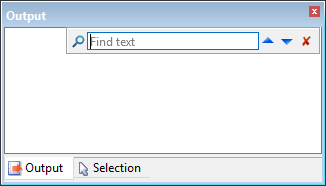
The Find command is used to search for a specific word or phrase in the content of the Output window. When a search is run, the Output window will scroll to focus on the first instance of the search phrase found in the content. A grey highlight will be displayed around the search phrase. The arrow buttons can be used to navigate through each instance of the search phrase found in the window.
Related commands:
• Clear
• Save All
Interface
The Find command launches as a toolbar in the Output window:
Option | Description |
Find text | The term or phrase to search for. Type in the box. |
| Click to search for the user-specified search phrase. |
| Click to search up through the content of the Output window to find a previous instance of the search phrase. |
| Click to search down through the content of the Output window to find the next instance of the search phrase. |
| Click to close the Find toolbar when you are finished searching. |
Procedure
1. Select the Find command.
2. Type the search term or phrase in the Find text box.
3. Click the Search button or press the <Enter> key.
4. Use the Up or Down Arrow buttons to navigate through the search results


