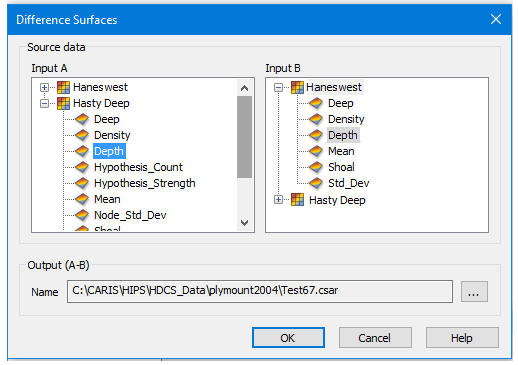
Menu | Tools > Surfaces > Difference |
Create a surface or coverage showing the differences in attribute values between two surfaces (either raster surfaces or point clouds) or between different layers or bands in a single surface. This command is useful for comparing changes to an area over time.
This function will compare two files (Input A and Input B) that cover part or all of the same area, or a single file containing multiple bands or attribute layers. Data in the layers being compared must be of the same type.
Input B will be subtracted from Input A to calculate the differences. The new surface generated for the difference will be the same type as Input A. For example, if Input A is a point cloud, the new will be a point cloud.
The resolution of the new coverage will be the same as the resolution of the coverage selected for Input A. |
If the two coverages do not share the same vertical coordinate system, the Vertical Coordinate System property for the resulting system is controlled by that of Input A. If this property has not been defined for Input A, the resulting surface also will have no vertical coordinate system defined.
Interface
The Difference Surface command uses this dialog box:
Option | Description |
Input A | The coverage and attribute band selected as input 1 for the comparison. |
Input B | The coverage and attribute band selected as input 2 for the comparison. |
Output (A-B) | The name and location for the resulting difference surface. |
Procedure
1. Select the Difference Surface command.
2. Select an attribute band from Input A and Input B for the coverages to be compared.
3. Specify a name and location for the Output surface.
4. Click OK.
The difference surface is created and added to the Layers window.
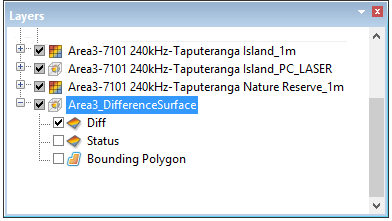
The colours of the difference surface represent the range of discrepancies between the two input sources. The dark areas of the surface represent greater depth differences than the light areas. If the contrast is not clear, the colour map settings can be changed using the Colour File property in the Properties window.
Example:
Difference Surface is useful for comparing changes to an area. A surveyed area can change considerably over time due to the redistribution of sediment with the currents. This redistribution can cause changes in depths. A difference surface can be used to find these changes by comparing two surfaces for the same area that were created at different times. Once the changes are found, the necessary updates can be done (charts updated, dredging, mariner notices, and so on).