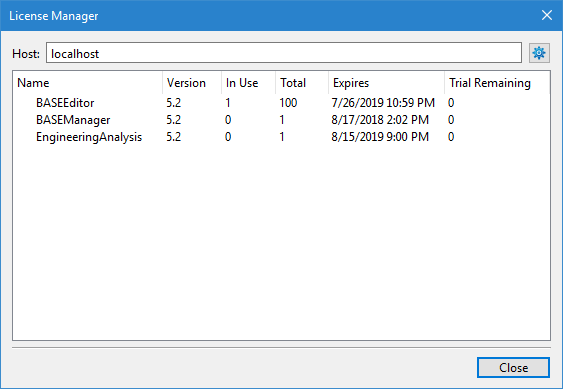
Once a license has been set up for an application, the details of the license can be viewed in the License Manager.
Menu | Help > License Manager |
The License Manager is accessible from the Help menu. The information provided by this tool includes:
• Host: the name of the computer housing the license in use. For a local license, this will be populated as “Local”; for a network license, it will be populated with the license server in use.
• Name: the names of the modules included in the license
• Version: the versions of the modules
• In Use: the number of work stations currently using the license
• Total: the number of seats available with the license; this will be 1 for a local license
• Expires: the expiry date of the license
• Trial Remaining: the number of days remaining in the trial if a trial license is being used
The Configure Licenses (gear) button in the top-right corner of the dialog box launches the License Setup wizard.
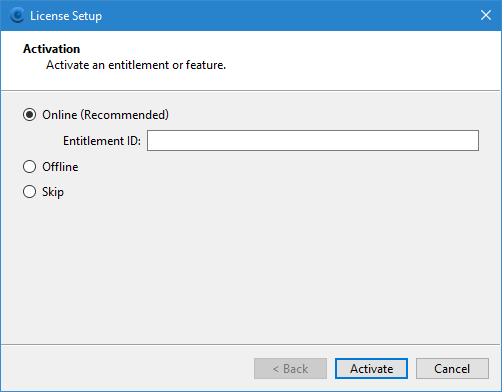
This is the same wizard that is provided the first time the application is started. Launching the wizard from the License Manager allows the license settings to be view and/or changed at any time after the initial run of the application.
The Skip option can be used if you only want to view the products included in the license, not change the license settings.
If changes are made to the license settings, the application must be restarted to apply the changes.