Menu | Edit > Edges > Intersect |
Tool |
|
Menu | Edit > Edges > Intersect |
Tool |
|
Intersect selected features. New edges are started at each intersection point but the features are not divided.
To cancel the operation during processing, press <Esc>.
Related commands: Intersect Features
Procedure
1. Select one or more features.
Features can be areas or lines.
2. Select the Intersect Edges command.
The edges of each feature are divided at each intersection point.
You can see the edges in the Components window.
Example
In this example, two lines cross. Each line has a single edge.
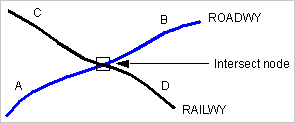
Intersecting these lines results in the following:
• one ROADWY line with two edges (segments A and B)
• one RAILWY line with two edges (segments C and D)
