Menu | Tools > Subset Editor > 2D View |
Tool |
|
Menu | Tools > Subset Editor > 2D View |
Tool |
|
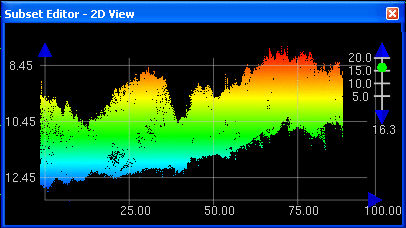
The 2D View in Subset Editor displays a profile of the soundings within the 2D slice box. You can use this view to examine and clean data.
The location and size of this cutaway view is determined by the size of the 2D slice box (see Resize Subset Bounding Box (Subset Editor)). As the slice box is re-sized or moved to another position in the subset, the display in the 2D View changes accordingly.
The example below displays depth data in the Subset Editor 2D View with the graticule (grid) option turned on.
All controls for the 2D View are set in the Subset Control window. See Subset Controls.
Procedure
1. Click the Expand ( + ) icon beside the HIPS Data layer and select the 3D View sub-layer in the Subset Control window.
2. Select the 3D View command to open the 3D view window.
