Menu | Help > Help Topics |
Tool |
|
Key | <F1> |
Menu | Help > Help Topics |
Tool |
|
Key | <F1> |
Display the help for the Teledyne CARIS application.
Procedure
1. Select the Help Topics command.
The home page of the help for the application is displayed in a browser window.
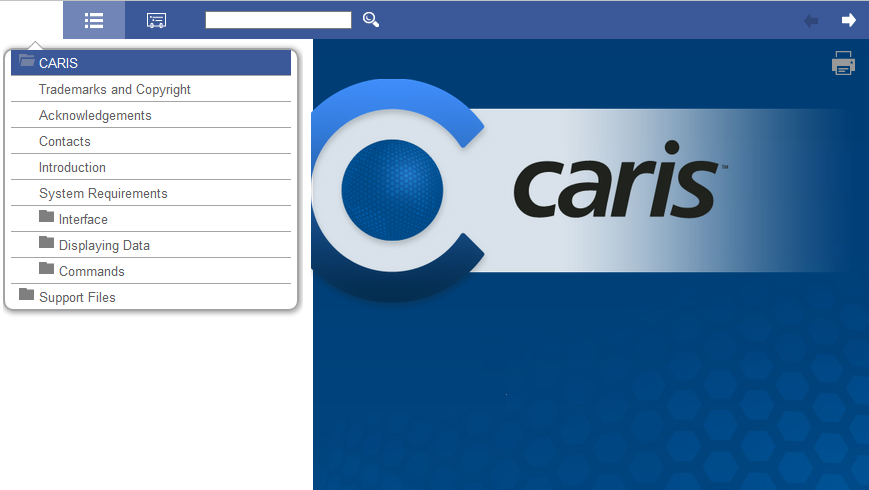
The following buttons are provided for navigating in the Help:
Button | Description |
| Display a hyper-linked table of contents for the help. Clicking a link will display the contents for the selected topic. The table of contents is displayed by default when help is launched. The list will remain displayed until either the button is clicked again to hide the list, or another button is clicked. If the screen size is made smaller, this may also cause the list to be hidden. |
| Display a hyper-linked, alphabetical index for the topics in the help. |
| Search all topics for a specific word or phrase. The results will be displayed in a list with the search word/phrase highlighted in each result. When a result is clicked, the relevant topic will be displayed with highlights on each instance of the search term in the topic. |
| Display either the Previous or Next topic in relation to the current topic. |
| Print the current topic. |
Help can also be launched by pressing the F1 key or clicking the Help button in a dialog box. Doing this will display the help content for the current process rather than the home page of the help.