Pop-up | Find (Output window) |
Find text in the Output window.
Related commands:
• Clear
• Save All
Interface
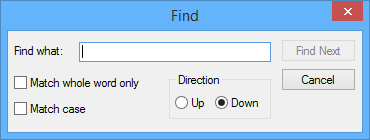
The Find command uses the following dialog box:
Option | Description |
Find what | The text to search for. Type in the box. |
Match whole word only | On: Find the search text only if it is a whole word. Off: Find the search text even if it is part of a another word. |
Match case | On: Find the search text only if it matches the case entered. Off: Find the search text regardless of case. |
Direction | Search upwards or downwards from the cursor. |
Procedure
1. Right-click in the window.
2. Select the Find command.
3. Type the text in the Find what box.
4. Set any other necessary options.
5. Click Find Next.
Found text is highlighted.