Menu | Tools > Features > Extract Features |
Copy features from a source layer, and extract them to a destination layer.
The features to be extracted are identified by an area feature polygon. Any features within the extents of the selected area feature will be extracted to the destination layer.
You need to have a destination layer in which to extract the features. This can be an existing feature layer, or you can create a new layer. If your source data does not already contain an area feature that can be used to identify the features to be extracted, it is recommended that you create the area feature on the new layer. Only features from the selected layer, within the extents of the area feature will be extracted.
Interface
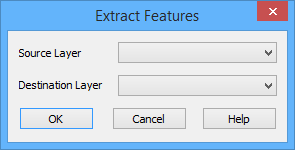
The Extract Features command uses the following dialog box.
Option | Description |
Source Layer | The layer that contains the data to be extracted. All feature layers currently open in the application can be used as a source layer. |
Destination Layer | The layer that the features will be extracted to. This field also lists all feature layers currently open in the application, however, S-57 ENC layers cannot be used. |
Procedure
1. Open the map containing the features you want to extract.
2. Select the New Feature Layer command and create a new S-57 layer.
3. Select the new layer from the Layers window.
4. From the Display window, select or create and select a polygon object that defines the area from which you want to extract one or more features. See Create for information on creating a feature.
The polygon object must be an “area” object. |
5. Select the Extract Features command.
The Extract Features dialog box is displayed.
6. Select a Source Layer from the list.
7. Select a Destination Layer from the list.
8. Click OK.
The selected features are copied from the source layer to the destination layer. The destination layer can then be saved to a HOB file if desired.