Menu | Tools > Coverages > TIN > Smooth TIN |
Pop-up | TIN Editor layer > Smooth TIN |
Smooth the edges of a TIN using a Laplacian smoothing algorithm. A single run of the process can apply multiple iterations of smoothing, analyzing every point in the TIN with each iteration. This analysis averages the values of the points directly connected to a point, updating the value of the point if the average is shoaler than the point’s value.
Changes will not be made to any points located on the boundary of the TIN or a hole in the TIN. |
It is recommended that this process be run on any TIN that will be used to generate contours because smoothed TINs generate smoother contours.
Unlike other edits to the TIN, smoothing is not restored the next time the TIN is created from the same band. Also, it cannot be undone without either resetting the TIN or recreating it.
Interface
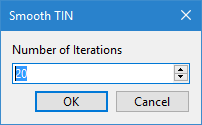
The Smooth TIN command uses the following dialog box.
Option | Description |
Number of Iterations | The number of times the smoothing algorithm will be applied. Each time the process is run, the updated point values will be averaged and the contours adjusted accordingly. |
Procedure
1. Select the TIN Editor layer in the Layers window.
2. Select the Smooth TIN command.
3. Specify the Number of Iterations to perform.
4. Click OK.
The TIN is smoothed.