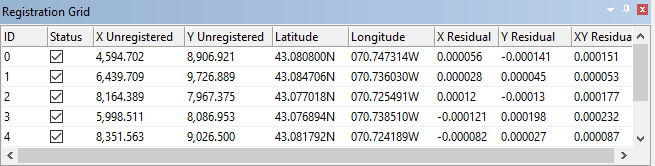
When an image or vector file is registered using the Register command, the control points are shown in the Registration Grid.
Column | Description |
ID | The control point number. |
Status | On: the control point is active and is used to determine registration Off: the control point is inactive and is not used in registration. However, inactive points are still saved in the RXL file and can be activated again when the image or vector file is reopened When a control point is inactive, the arrow representing it is dimmed during registration. The total number of control points in the Vectors Applied field in the Registration Summary window changes. For more information, see Registration Summary Window. |
X unregistered | The X location of the control point on the image or vector data. |
Y Unregistered | The Y location of the control point on the image or vector data. |
Latitude Registered | The X position of the control point on the registered data. If you are using Ground coordinates, this column is called X Registered. |
Longitude Registered | The Y position of the control point on the registered data. If you are using Ground coordinates, this column is called Y Registered. |
X Residual | Residual values at the X position. Residuals are shown in decimal degrees. |
Y Residual | Residual values at the Y position. Residuals are shown in decimal degrees. |
XY Residual | Combined or overall residual error. Residuals are shown in decimal degrees. |
Residuals display the difference in position between the digitized control point and the computed control point. Residual values reveal discrepancies in the control points and help identify points that are off-position. If the residual values within a column are similar then the target positions are fairly accurate. Wide differences between values suggests that the registration is not accurate.
If the Registration Grid is not visible, display it using the Display Registration Grid command.
Menu | View > Windows > Registration Grid |
For more information, see Register.