Problems with sensor offsets, auxiliary sensor data, and so forth, become readily apparent in the surface. Relying on a surface to highlight problems in the auxiliary sensors can improve processing efficiency, because you are no longer required to investigate the motion and navigation for each survey line.
In the HIPS multibeam workflow, the auxiliary sensor data was not investigated prior to creating the surface. So at this point, you can use the surface to highlight problem areas that may exist.
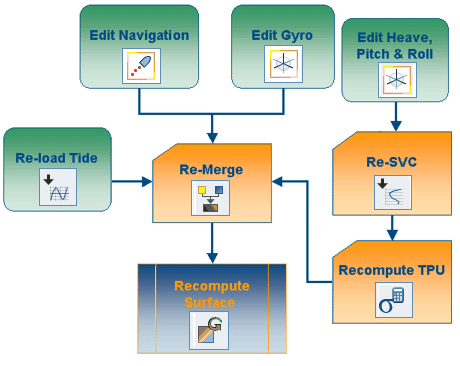
Certain edits will require that data be Merged again. For example, if you reload tide, edit navigation, or edit gyro, you will need to Merge the modified lines again.
Lock Subset Area (Subset Editor)
Apply Attitude Filters
If you edit heave, pitch or roll, you will need to re-apply Sound Velocity Correction. If you re-apply SVC, recompute TPU before Merging again.
Sound Velocity Correction
Merge
If any project lines are re-Merged, the surface will need to be re-generated.