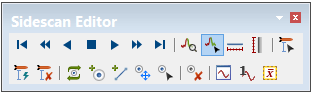
The Side Scan Editor toolbar is displayed when the editor is opened.
The toolbar contains controls to navigate through the track line and perform other functions.
Toolbar Buttons | Purpose |
| Playback tools used to scroll through the side scan data in Side Scan view (see Navigate in Side Scan Editor) |
| Zoom in (see Zoom in Side Scan View) |
| Select a range of data in Side Scan View (see Selection) |
| Measure distance / Measure shadow (see Measure Distance in Side Scan View and Measure Shadow in Side Scan View) |
| Digitize altitude manually or automatically, and clear altitude (see Digitize Altitude (Side Scan) ) |
| Contacts: add point or line contact, repeat, remove and select (see Add Contact) |
| Purge Rejected Contacts (see Purge Rejected Contacts. |
| View waveform (see Signal Display Window) |