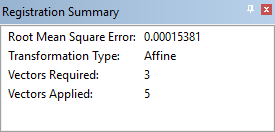
This window provides information about the registration in progress.
The window is displayed when the Register command is selected. While the registration process is being executed, the window will list the following items:
• Root Mean Square Error: The deviation that is created when more control points are added than is required by the selected transformation type.
• Transformation Type: Affine, similarity, and polynomial.
• Vectors Required: Minimum number of control points that can entered using the selected transformation type.
• Vectors Applied: The number of actual control points that are used during the registration process.
If the Registration Summary window is not visible, display it using the Display Registration Summary command.
Menu | Window > Other Windows > Registration Summary |
For more information, see Register.