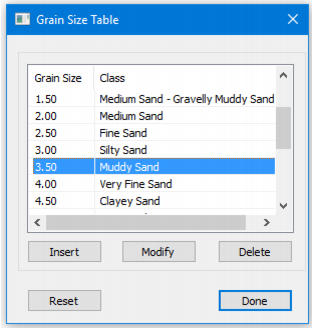
The classes of sediment which are displayed by the sediment analysis are based on values in the Grain Size table. This table can be customized while in Advanced mode.
1. Select the Advanced option from the Display field in the Sediment Analysis Editor control window.
2. In the Results field, click Edit to open the Grain Size table.
The Grain Size Table dialog box is displayed.
Grain size values and their descriptions can be edited using the Modify button. To modify a value:
3. Select a line in the table, and click Modify.
The Grain Size Table edit dialog box is displayed.
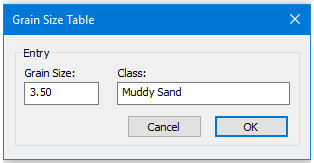
The selected grain size and its class are displayed.
4. Edit the field values and click OK.
New classes can be added using the Insert button, which will open the edit dialog box so a new entry can be added. The Delete button will remove a line from the table.
Use Reset to restore the default values.