Menu | Tools > Engineering Analysis > Model > Make Features Horizontal |
Make all selected surfaces and lines horizontal by applying a single depth value.
Interface
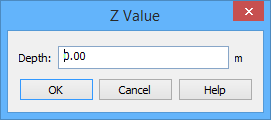
The Make Features Horizontal command uses the following dialog box.
Option | Description |
Depth | The Z value to be applied to all selected reference model features. The name of this field will change based on the Z-axis convention setting of the application. "Depth" is used when the Z-axis convention is positive down, "Height" when the convention is positive up. Similarly, the unit of measure for the field is controlled by the settings in the Units category in Tools > Options. |
Procedure
1. Select either the Surfaces or Lines layer in the Layers window.
2. Select one or more surface or line features in the Display window.
3. Select the Make Features Horizontal command.
The Z Value dialog box is displayed.
4. Type a Depth value.
5. Click OK.
The depth value is applied to all selected features.