Menu | Tools > Coverages > Modify > Finalize |
Tool |
|
Menu | Tools > Coverages > Modify > Finalize |
Tool |
|
Finalize a surface to prepare it for other uses. Define a source of uncertainty and apply designated soundings to override the nearest existing nodes in the surface.
Interface
The Finalize Surface command uses the following dialog box.
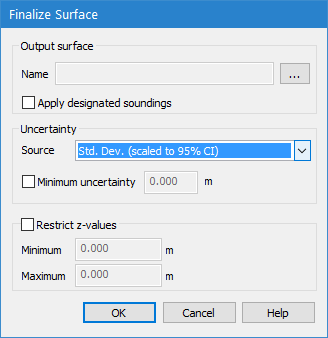
Option | Description |
Name | The file name and location for the finalized surface that will be created. 1. Click browse (...) to launch the Save As dialog box. 2. Enter a name and select a location for the new file. |
Apply designated soundings | Enable this option to ensure that designated soundings are retained in the resulting surface. |
Source | The uncertainty source to apply for uncertainty calculations. |
Minimum uncertainty | The minimum uncertainty value to be accepted. |
Restrict z-values | Limit the nodes that will be included in the finalized surface by specifying a range of values to include. Only nodes that fall within this range will be included in the resulting surface. 1. Click the check box to enable this option. 2. Enter a Minimum z-value for the range to be included. 3. Enter a Maximum z-value for the range to be included. |
Procedure
1. Select the surface in the Layers window that you want to finalize.
2. Select the Finalize command.
3. Specify the name and location for the output file.
4. Select an option from the Final uncertainty from drop-down list.
5. Set any necessary options.
6. Click OK.
The finalized surface is created.
