Menu | Model > Create Template from Selection |
Create a new reference model from a selection of existing polygon feature objects. A reference model surface and any necessary points are generated for each polygon feature in the selection. If the polygon features have Z-values defined in their attributes, those values are assigned to the reference model surfaces using the first three non-collinear points. A single template is created encompassing the resulting surfaces. This is all contained in the new reference model.
A catalogue matching file is used to map values from the attributes of the feature objects to the attributes of the model features. The default mapping can be used, or a custom catalogue matching file can be specified. Values populated through the attribute mapping will overwrite depth values that were populated by default from the feature object Z-values.
Interface
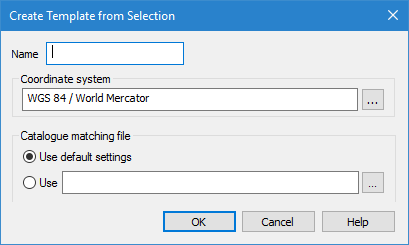
The Create Template from Selection command uses the following dialog box.
Option | Description |
Name | The name to assign to the new reference model. |
Coordinate system | The coordinate reference system (CRS) to assign to the new reference model. 1. Click the browse button (...) to launch the Select Coordinate Reference System tool. 2. Select a CRS and click OK to return to the Create Template from Selection dialog box. |
Catalogue matching file | Choose the catalogue matching file to use for mapping attribute values. The options include: • The default settings defined for the application. Select Use default settings. • A custom catalogue matching file. Select Use, then click the browse button (...) and navigate to the relevant file. |
Procedure
1. Enter a Name for the reference model.
2. Select the coordinate reference system to assign to the reference model.
3. Select a Catalogue matching file option.
4. Click OK.
The reference model features are generated with attribute values mapped from the input feature objects. A new layer is added to the Layers window with the user-specified name and the new model is displayed in the Model window.