Menu | Select > By Filter > Attribute Value |
Tool |
|
Menu | Select > By Filter > Attribute Value |
Tool |
|
Select features based on their attribute values.
Related commands:
• Select Features Inside Selected Areas | • Remove Others from Selection • Remove |
Procedure
1. Select a layer.
2. Select the Select by Attribute Value command.
The Select by Attribute Value dialog box is displayed.
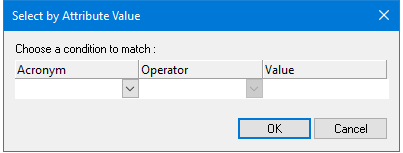
Option | Description |
Acronym | An attribute acronym. Select from the list. |
Operator | Available operators depend on the selected acronym. Select from the list: |
Value | The type of value depends on the selected acronym. Type values or select from a list as required. Depth and height values are displayed according to the precision settings using the Options command. |
Layer Name | [create layer only] A name for the layer. Type in the box. |
3. Select an attribute, operator, and value.
4. Click OK.
Features that meet the search criteria are selected.
