Menu | Tools > TIN > Create TIN |
Tool |
|
Pop-up | raster surface > Create TIN (Layers window) |
Menu | Tools > TIN > Create TIN |
Tool |
|
Pop-up | raster surface > Create TIN (Layers window) |
TINs can also be created for raster surfaces gridded relative to planes. These TINs can be viewed in both 2D and 3D, and can be rotated in the 2D display to be viewed face on. They can be used in volume calculations used in the monitoring of deformation, such as that of quay walls. Profiles of TINs can be created using the profiling tools in your CARIS application.
To create a TIN on an inclined surface:
1. Select a raster surface in the Layers window.
2. Select the Create TIN command.
The Create TIN dialog box is displayed.
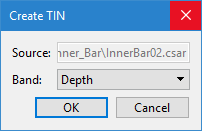
3. Select the band containing the elevation values from which to create the TIN and click OK.
A TIN layer is created and added to the Layers window.
4. Select the TIN layer and refresh the Display window to view the TIN.
5. [Optional] Turn on the 3D view by choosing View > 3D View.
6. [Optional] In the 2D view, right-click on the TIN layer and choose Use Coordinate System to display the raster surface and its TIN face on.
