Menu | Process > Georeference Bathymetry |
Tool |
|
Menu | Process > Georeference Bathymetry |
Tool |
|
This process converts along track/across track depths in raw data into latitude, longitude, and depth by combining the ship navigation with the horizontal and vertical offsets from the HIPS vessel file. This geographically references the sounding position and depth.
The default functionality of Georeference Bathymetry is to merge the HIPS data from time-based sensor data into processed geographically-referenced depth data.
All other functions for SVC, TPU computation or to apply a vertical adjustment using GPS height or tide from traditional or from zones, are optional.
Interface
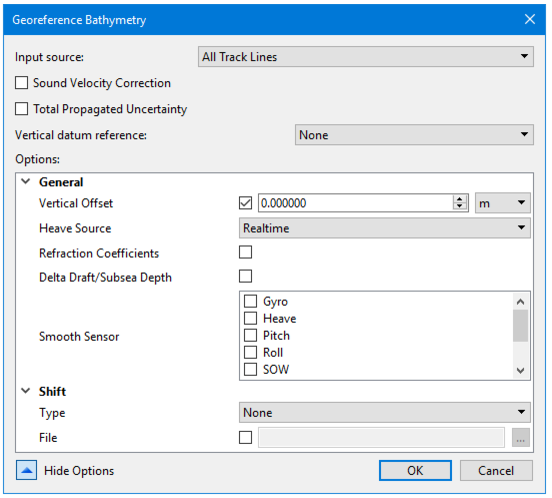
These functions are applied using the Georeference Bathymetry dialog box.
|
|
Input Source | The Input Source field defaults to “Selected Track Lines” If you select a line or lines before opening the Georeference Bathymetry dialog box. To apply process to All Track Lines select “All tgrack Lines from the drop list. If no lines are selected the process will be applied to All Track Lines. |
Input source | track line selected or all track lines |
Sound Velocity Correction | option |
Total Propagated Uncertainty | -optionally applied |
Vertical datum reference | None , Tide GPS |
Show Options | Click the down arrow to display the list of options. |
General | |
Shift: Type | Aper beam shift to the processed depth solution from a beam look-up table. The beam shift look-up table consists of two columns, one contains the beam number and the other the value of the shift. Only the beams listed in the table will be shifted. For example: Beam number, Shift Value 1,2 2,2 3,2 22,3 75,1 The values can shift statically or by percentage of the water depth of the sounding being shifted. • None: No beam shift will be applied • Static: Static beam shifts will be applied - as a straight shift (positive down, depths get deeper) • Relative: Relative beam shifts will be applied as a percentage of the depth being shifted. The default value is None. |
|
Procedure
1. Select a line or group of lines.
2. Select the Georeference Bathymetry command from the Process menu or toolbar.
3. In the dialog box, select Input source.
4. Set options if desired.
5. Click OK to apply the process.
