Menu | Tools > Surfaces > Fill Raster Holidays > By Pointing |
Tool |
|
Menu | Tools > Surfaces > Fill Raster Holidays > By Pointing |
Tool |
|
The Fill Raster Holidays by Pointing command is used to manually fill individual empty nodes in a grid using values from surrounding populated nodes. This command can be repeated as many times as needed, altering the interpolation criteria for each hole if desired.
When a hole is selected to be filled using this command, the process begins by classifying all nodes in the surface as data, holes, or no-data (areas beyond the surface data but within the extents of the surface). The classification information is saved to a temporary Holidays band. This is done entirely in the background and will not be visible in the application.
The classification for the selected node is then used to fill the hole based on user-specified criteria. All selected holes must be completely within the view extents in order for them to be filled. If a hole cannot be filled, any changes that may have been applied to that hole will be reverted and a message will be displayed in the Output window.
An Interpolated band is added to the surface to contain the interpolated nodes. The name of this band will differ depending on the name of the primary elevation band in the surface. For example, if the primary elevation band were called Depth, the new band would be called Depth Interpolated. This band can be used with filters to identify the interpolated data. This band will be updated each time that the command is run to fill additional holes.
This command will remain selected and active until:
• the command is manually toggled off,
• another command is selected, or
• another layer is selected.
The changes made to the surface through this process cannot be reverted using the Undo command; it is recommended that you back up your data prior to running the command.
Related commands:
• Fill Raster Holidays (Entire dataset)
• Fill Raster Holidays - By Range
Interface
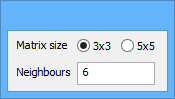
The Fill Raster Holidays by Pointing command uses the following dialog box.
Option | Description |
Matrix size | The number of nodes surrounding a hole that will be analyzed for populated values. The options are 3x3 or 5x5, meaning the application will analyze a square area around each pixel of the hole that is either 3 pixels high and 3 pixels wide, or 5 pixels high and 5 pixels wide. See Matrix Size and Neighbours for more information. |
Neighbours | The number of pixels within the matrix area that must contain data in order for the hole to be interpolated. For example, if you select the 3x3 matrix size option and enter a neighbours value of 6, that area must have at least 6 populated data nodes in order for a pixel in the hole to be interpolated. If there are not enough populated nodes present in the matrix area, it is possible that only some pixels in the hole will be interpolated or the hole will be skipped entirely by the process. See Matrix Size and Neighbours for more information |
Procedure
1. Select the root layer of the surface containing the holes to be filled.
2. Select the Fill Raster Holidays by Pointing command.
A dialog box is displayed to define the interpolation settings and the cursor changes to indicate the interpolation method.
3. Select a Matrix size option.
4. Type a value in the Neighbours field.
The values entered for Matrix size and Neighbours will be remembered the next time the command is run. |
5. Click a hole to have it filled.
The process performs as many iterations as needed to fill the selected hole(s) and flags those nodes as interpolated.
6. [Optional] Continue clicking to fill any remaining holes in the surface.
Turn off the command.
