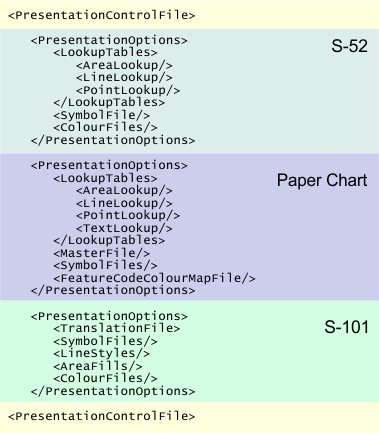
The Portrayal Control File links a portrayal to required files for chart presentation. These files include lookup tables (line, area or point), symbol files, and colour tables.
The default file is located in C:\Program Files\CARIS\Caris\ and is named
<version>\systemportrayalcontrol.xml.
The structure of the control file is shown below.
The following table lists tags in the file.
Tag | Description |
| Root tag for all tags and elements. Attributes:
|
| Parent tag for a specific portrayal. Attributes:
|
| Parent tag for the lookup tables for areas, lines, points, and where necessary, text. |
| The file that controls symbology, colour and other display properties of area features. This tag is a child tag of Attributes:
|
| The file that controls symbology, colour and other display properties of line features. This tag is a child tag of Attributes:
|
| The file that controls symbology, colour and other display properties of line features. This tag is a child tag of Attributes:
|
| The file that controls text properties in INT1 charts. This tag is a child tag of Attributes:
|
| Folder containing symbol files for S-52 features. Attributes:
|
| Name of the binary file containing INT1 symbols for paper charts. Attributes:
|
| Folder containing colour tables based on ECDIS display modes. Each file contains colour tokens for displaying features. Attributes:
|
| Path for the file containing colour tokens for INT1 display in paper charts. Attributes:
|
| The colour table associates symbolization codes in the ih_master file with colour tokens for INT1 paper chart display. Attributes:
|
| A text file that contains CARIS symbolization codes. Attributes:
|
| Folder containing the Extensible Stylesheet Transformations (XSLT) files for defining S-101 features. |
| Symbols for features. Attributes:
|
| Files for drawing line styles. Attributes:
|
| Files for area fills. Attributes:
|
| Folder containing colour tables based on ECDIS display modes. Each file contains colour tokens for displaying features. Attributes:
|