Menu | Window > Reset Default Layout |
Restore the windows and toolbars to the size and position they had on installation.
Related commands:
• Layouts
Procedure
1. Select the Reset Default Layout command.
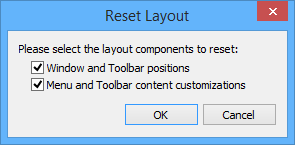
The Reset Layout dialog box is displayed.
Option | Description |
Window and Toolbar positions | Restore the positions of the windows and toolbars. |
Menu and Toolbar contents customizations | Restore the contents of the menus and toolbars. This will remove any customized tools. |
1. Enable one or more options.
The default window layouts are restored.