Interface
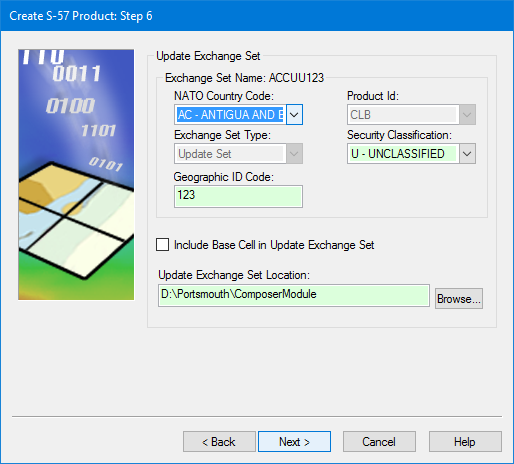
Update exchange set for all AML 1.0 and AML 2.1 products
Option | Description |
Exchange Set Name | The AML format requires a specific naming convention for exchange sets. This is built from the following options. • NATO Country Code: A code to identify the producing country. This forms the first two characters of the exchange set name. • Product ID: The AML product type. This forms the third character of the exchange set name. • Exchange Set Type: The type of exchange set. This forms the fourth character of the exchange set name. • Security Classification: This forms the fifth character of the exchange set name. • Geographic ID Code: This forms the last three characters of the exchange set name. |
Include Base Cell in Update Exchange Set | On: Copy the base cell and external files from the base exchange set to the update set and update the Off: Do not copy the base cell. |
Update Exchange Set Location | Select a location for the new exchange set. |
Procedure
1. Define any mandatory fields.
2. Define any other fields required by your agency.
3. Click Next.