Menu | Create > SCAMIN Values |
Set the minimum display scale of features. This is the SCAMIN attribute. Soundings are calculated separately from non-sounding features.
The SCAMIN value of a feature determines the display scale below which the feature is no longer visible on an Electronic Chart Display and Information System (ECDIS). The purpose of SCAMIN is to reduce the amount of clutter displayed to the ECDIS user.
SCAMIN is calculated using either a scale method or a step method. The method is chosen by selecting a mapping file in the Assign SCAMIN to Selection dialog box. The mapping files are located in ...\CARIS\BASE Editor\4.3\modules\Compose\support.
File | Method | Description |
assignscamin.xml | Scale | Applies scale factors to ENC and AML products. |
assignEUIENCSCAMIN.xml | Scale | Applies a scale value based on the IENC Encoding Guide 1.3.1 for European IENC |
assignUSIENCSCAMIN.xml | Scale | Applies a scale value based on the IENC Encoding Guide 1.3.1 for US IENC. |
S65_ScaminMapping.xml | Step | Applies step rules from the S-65 standard for ENC consistency to calculate SCAMIN for ENC and AML products. |
sdgparm.txt | Soundings | Applies scale factors to calculate SCAMIN for soundings in all products |
You can modify these files or create custom files. For more information, see the Support Files section.
Interface
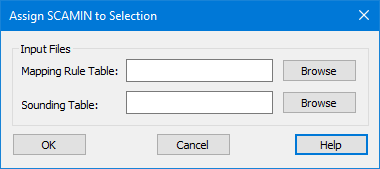
The Assign SCAMIN to Selection dialog box:
Option | Description |
Mapping Rule Table | The file used to apply SCAMIN rules to area, line, or point features. Click Browse to select the path and file name. |
Sounding Table | The file used to apply SCAMIN rules to sounding features. Click Browse to select the path and file name. |
Procedure
1. Select the HOB layer.
2. Select features to which the SCAMIN values will be applied.
3. Select the SCAMIN Values command.
The Assign SCAMIN to Selection dialog box is displayed.
4. Click Browse to select the Mapping Rule Table.
5. Click Browse to select the Sounding Table.
6. Click OK.
SCAMIN values are applied to the selected features.
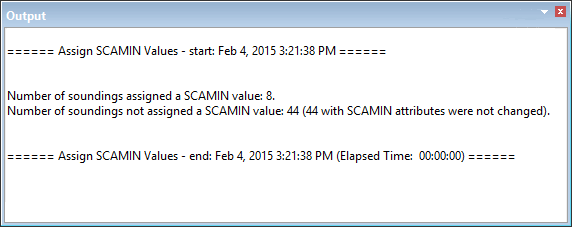
The results are displayed in the Output window.