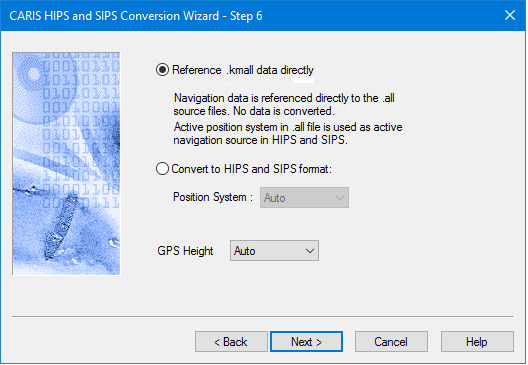
All navigation sources from Kongsberg *.kmall files can be referenced directly instead of converted. The primary navigation source in the *.kmall file will be set active on conversion to HIPS.
Since Set Navigation Coordinate System is set to Geographic, by default, Kongsberg *.kmall files do not require a navigation coordinates type to be set.
Navigation timestamps can be selected from either the logging system or from the GPS string in the navigation datagram. The default setting is Auto.
Retaining the default setting means the import process will search for GPS Height data, and if not found, will apply timestamps specified by the Installation datagram.
Interface
Options for converting Kongsberg KMALL data to HIPS are displayed in the following dialog boxes.
Option | Description |
Reference *.all data directly | The default setting is to reference data files directly. |
Convert to HIPS and SIPS format | 1. Select Convert to HIPS and SIPS format to convert navigation data to HDCS. This activates the Position System field. |
Position System | 1. Select the navigation device number to convert if navigation is converted to HDCS, and the source of GPS height if GGA or GGK is used. • AUTO • NAVIGATION_1 • NAVIGATION_2 • NAVIGATION_3 The default value is AUTO, which uses the positioning system that is set as “active” from acquisition. |
GPS Height | 1. Select the GPS height device to use. • AUTO • MRU1 • MRU2 • HEIGHT • GGA • GGK The default value is AUTO, which uses the GPS string in the positioning system that is set as “active” from acquisition. |
Procedure
1. Set options.
2. Click Next to set further Kongsberg conversion options.