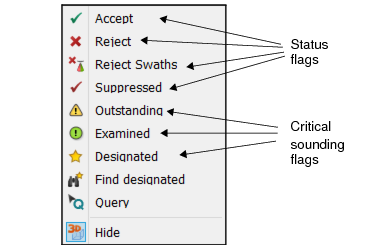
Soundings in the 2D and 3D Views can be interactively examined and their status flags can be turned on and off as needed. To start with, a sounding is flagged as Accepted.
Status flags for selected soundings can be turned on from the right-click menu in the Subset Editor 2D or 3D View. Flags can also be set for queried soundings from the right-click menu in the Selection window.
When you select data in the 3D View, all data in the highlighted area is selected, not just the visible data. |
The flagged data will be displayed in the colour set for the specific status in the Status field of Tools > Options > Display > Subset.
Procedure
1. Select the Subset Editor command. Open Subset Editor.
2. Define the area in the Display window to be included in the subset. and
3. Load data in the defined area into the Subset Editor windows.
If data for any line has not been merged, the depth information for data may not be accurate. In this case, the subset will be loaded, but the Output window will warn you that the processed depths for a specified line are outdated and require Merge. (See Merge.) |
4. Select data to be edited in the 2D or 3D window.
5. Select the appropriate setting from the Status Flag menu, from the Subset Editor toolbar or the pop-up menu.