Menu | Select > Information Objects |
Select information objects in an S-101 product.
Procedure
1. Make sure an S-101 product layer is selected.
2. Choose the Select Information Objects command.
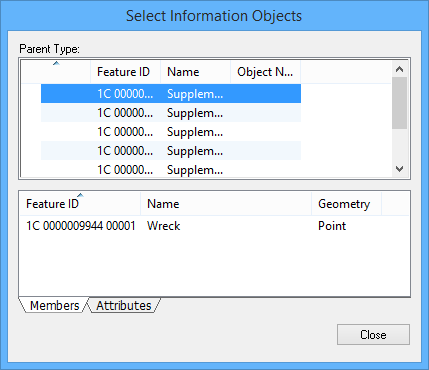
The Select Information Objects dialog box is displayed.
The Parent Type list shows all information objects in a product. When an information object is selected, the features that are associated with it are listed in the Members tab. Attributes of the information object are listed in the Attributes tab.
3. Right-click in the Parent Type list or one of the tabs and choose from the commands in the pop-up menus:
Menu Item | Description |
Parent Type | |
Add members to selection | Add the features associated to the information object to a selection in the product |
Create Selection from Members | Create a selection from features associated to information object |
Members tab | |
Add Member to Selection | Add the feature to a selection in the product |
Create Selection from Member | Create a selection in the product with the feature |
Attributes tab | |
Copy | Copy the selected information-type attribute |
Copy All | Copy all information object attributes. |