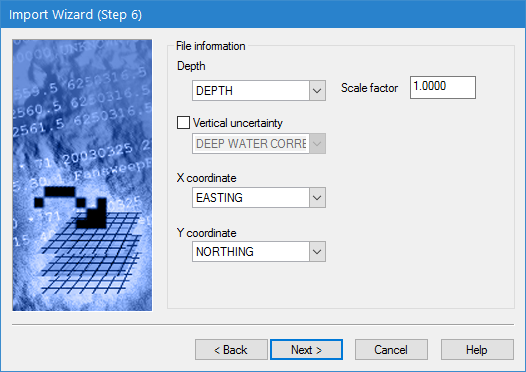
This step of the Import Wizard is used to define HTF-specific settings.
Interface
The HTF Options step of the Import Wizard is shown below.
Option | Description |
Depth | The attribute in the source data to map to the Depth values in the output coverage. |
Scale Factor | HTF files sometimes store depth values in a format that does not include decimal places. For example, a depth of 10.5 may be stored as 105. If this is the case, the Scale factor field can be used to apply a multiplier to the data to adjust the values accordingly. For this example, a multiplier value of 0.1 would correct the depth values. |
Vertical uncertainty | The attribute in the source data to map to Vertical uncertainty in the output coverage. |
X coordinate | The attribute in the source data to map to the X coordinate values in the output coverage. |
Y coordinate | The attribute in the source data to map to the Y coordinate values in the output coverage. |
Procedure
1. Select an attribute from the drop-down list for Depth. If necessary, specify a Scale factor for the depth values.
2. [Optional] Click the check box to enable Vertical uncertainty and select an attribute from the drop-down list.
3. Select an attribute for each of the coordinate options.
4. Click Next.