Menu | File > Export > Selection > S-57 |
Export a selection of features to an S-57 file, extension .000.
Related commands:
Procedure
1. Select the features to be exported.
2. Select the Export Selection to S-57 command.
A Save As dialog box is displayed.
3. Select a location and a name for the file.
4. Click Save.
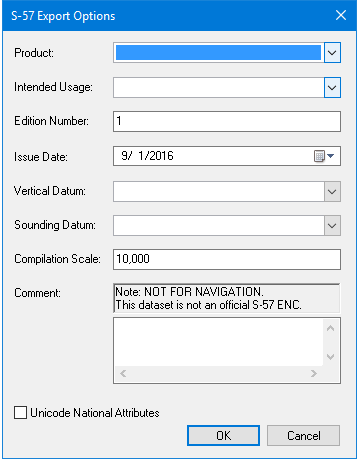
The S-57 Export Options dialog box is displayed.
Option | Description |
Product | Product type. Select from the list. |
Intended Usage | The usage that the data will be exported to. The usage controls the scale. Select from the list. Values will depend on the product type. |
Edition Number | The default number is always 1, but it can be changed to any positive number can, if necessary. Type a number. |
Issue Date | Select a date from the calendar.The current date is the default. |
Vertical Datum | The datum used to reckon altitude, clearances, etc. Select from the list. |
Sounding Datum | The reference plane from which depths are reckoned. Select from the list. |
Compilation Scale | The scale at which the data was originally compiled. Type a scale denominator in the box. |
Comment | The first section states that this file is not intended as a guide for navigation. This section cannot be edited. The second section is a text field for typing additional comments. |
Unicode National Attributes | On: Attribute data is exported in Unicode format. Off: Attribute data is exported how in ASCII format. |
5. Set any necessary options.
6. Click OK.
The selected features are associated to the catalogue. You can view the results of this process in the Output window.