Menu | Select > By Filter > Feature Acronym |
Tool |
|
Menu | Select > By Filter > Feature Acronym |
Tool |
|
Select features by acronym.
Related commands:
• Select Features Inside Areas | • Remove Others from Selection • Remove |
Procedure
1. Select a layer.
2. Select the Select by Feature Acronym command.
The Select by Feature Acronym dialog box is displayed.
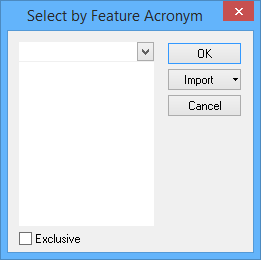
Option | Description |
Select the acronym | Select one or more acronyms using one of the following methods: • Type in the box. If any acronyms start with the letters you type, they will be displayed. • Click the down-arrow and select from the list. • Click Import and select from the menu: • From Clipboard: The contents of the clipboard are copied to the list. For this to work correctly, the clipboard must contain one or more acronyms, one to a row, in all upper-case. • From Selection: The acronyms of any selected features are added to the list. • From Superselection: The acronym of the selected feature is added to the list. |
Exclusive | Off: The filter will select only the features that meet the criteria. On: The filter will select all features except those that meet the criteria. |
3. Type, select, or import the acronyms.
If you import acronyms from the clipboard, make sure that the acronyms are in upper-case. |
4. Click OK.
All features with the selected acronyms are selected.
