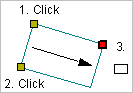
Pop-up | Line Digitizer > Rectangle [3 points] Area Digitizer > Rectangle [3 points] |
Use with the Create Line Feature or Create Area Feature command.
Digitize a rectangle by specifying three points.
Related commands:
Procedure
1. Select the Digitize Rectangle Using Three Points command.
2. Click the first two points (1 and 2).
This defines one edge of the rectangle.
3. Press and hold the left mouse button.
4. Drag the cursor to expand the rectangle.
This defines the other dimension of the rectangle. Note that the point is at the corner of the rectangle, not necessarily at the location where you click.
5. Release the mouse button.
The rectangle is added.