Menu | Tools > Coverages > Warp |
The Warp tool enables you to transform raster surfaces and point clouds.
This powerful tool can be used to transform data in a number of ways, including:
• Transform a point cloud to a new coordinate system
• Transform a raster surface to a new coordinate system and populate attribute values using one of a number of interpolation methods.
• Resample a raster surface to a new resolution.
Different processes are used to transform point clouds and raster surfaces. In both cases, the user controls the selection of the primary elevation band and the treatment of additional bands. The transformed data is saved to a new file without modifying the original dataset.
The primary elevation band is the band containing the data values that most operations will be performed on. In the case of bathymetric datasets this band will usually be defined as Depth, Elevation, Height or similar. |
When the warp tool is applied to a point cloud, each data point in the source coordinate system is transformed independently to the output coordinate system. The values in the additional bands can be carried unchanged through the transformation.
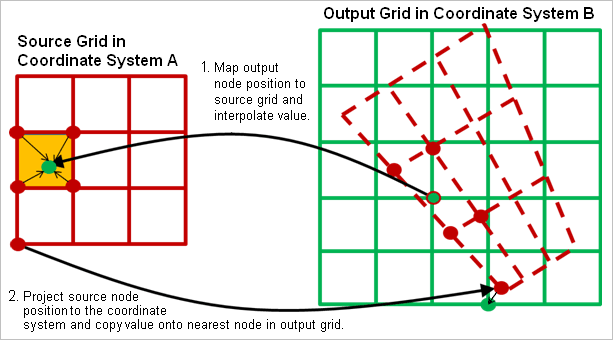
Because source and transformed grids cannot be guaranteed to have a 1:1 mapping, even when the two grids have similar origins and resolutions, different techniques are needed to handle the transformation of raster surfaces that are taken to be representations of continuous surfaces.
The Warp tool enables you to transform raster surfaces and point clouds.
This powerful tool can be used to transform data in a number of ways, including:
• Transform a point cloud to a new coordinate system
• Transform a raster surface to a new coordinate system and populate attribute values using one of a number of interpolation methods.
• Resample a raster surface to a new resolution.
Different processes are used to transform point clouds and raster surfaces. In both cases, the user controls the selection of the primary elevation band and the treatment of additional bands. The transformed data is saved to a new file without modifying the original dataset.
The primary elevation band is the band containing the data values that most operations will be performed on. In the case of bathymetric datasets this band will usually be defined as Depth, Elevation, Height or similar. |
When the warp tool is applied to a point cloud, each data point in the source coordinate system is transformed independently to the output coordinate system. The values in the additional bands can be carried unchanged through the transformation.
Because source and transformed grids cannot be guaranteed to have a 1:1 mapping, even when the two grids have similar origins and resolutions, different techniques are needed to handle the transformation of raster surfaces that are taken to be representations of continuous surfaces.
If the grid is not assumed to represent a surface or if the use of interpolation is not appropriate, a point-like transformation process for gridded datasets is also available. Each source grid node is treated as an independent point and projected to the output grid (illustrated as process 2, above). A minimum or a maximum bias is applied as the values are copied to ensure you do not lose important shoal/deep measurements. The attribute values attached to that node are then copied onto the nearest output grid node.
When both of these processes are applied, the interpolation is performed first, populating the output grid completely with interpolated values. The true values from the source are identified based on the applied bias, and then copied onto the nearest node in the output grid, overwriting the interpolated cell value.